
Quartz PCI — Microscope Image Acquisition & Analysis Software
Quartz PCI is the preferred microscope image acquisition, processing, archiving and measurement software of thousands of researchers around the world. PCI software helps you manage all aspects of the imaging process including acquisition, processing, annotation, measurement, reporting, archiving and retrieval.
Quartz PCI software is available in both Lab and Office versions. Quartz PCI Lab is installed on instrument PCs and includes image capture functions. Quartz PCI Office is installed on office workstations and allows image processing and annotation to be carried out offline, away from the instrument. PCI Office includes all of the functionality of PCI Lab, except for data acquisition.
What's NEW in QUARTZ PCI 12
Auto Scroll During Measurement
If you move the mouse outside of the image window during measurement, the image will scroll automatically, allowing you to perform measurements conveniently at higher zoom factors.
Fine Rotation Improvements
Separate coarse and fine sliders provide greater control and accuracy when rotating images.
Auto Save Improvements
The Auto Save function has been improved to be more intuitive to use, particularly with respect to saving files to the database.
Support for the EMD File Format
PCI can now import calibrated images in the EMD file format.
Large File Support for “SEND TO”
The Send To function now supports transfers of files greater than 4 GB in size.
Arrange Labels Function
The Display | Arrange Labels function is used to move measurement labels automatically to minimize overlaps.
Subscription-Based Software
Quartz PCI is now sold by subscription. As a subscriber, you have ongoing access to technical support and will periodically receive updates to the latest version.
Link to Technical Support AI Chatbot
The Help menu contains a link to our technical support AI chatbot.
The chatbot is constantly learning and being updated with the latest information and may be able to provide instant answers to your support questions.
Support for the Latest Windows 11 Release (32-Bit & 64-Bit Versions)
PCI Version 12.0 runs on the 32-bit and 64-bit versions of Microsoft Windows 7, Windows 8, Windows 10 and Windows 11 (releases current at the date of shipment of your software).
Improvements to the Automated Measurement Module
In conjunction with the release of PCI 12, we are also releasing PCI-AM 9, the biggest update yet, with a host of new features.
- PCI-AM 9 adds Template Matching where users simply draw a desired shape with our new template editor, and PCI-AM will search, locate, and measure all features corresponding to the template shape without any manual intervention.
- There are a lot more improvements. For details, request the PCI-AM 9 Product Sheet from Quartz Imaging.
Microscope Image Acquisition
Quartz Imaging offers specialized modules for image capture from digital and analog electron microscopes (SEMs, STEMs, TEMs), light microscopes, video sources, TWAIN devices and virtually any other kind of imaging instrument. PCI’s comprehensive support for many types of instruments means that you only need to learn how to use one software package to acquire data from all of your laboratory instruments. Even EDX data can be handled through PCI’s ability to import EMSA files.
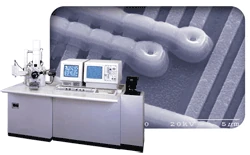
- Options available to acquire images from virtually any image producing device including slow scan SEM and STEM, TWAIN, video capture and digital file import
- Imports images in numerous image formats
- Imports EDX data in EMSA format
Image Processing Software
Once you have acquired your images, PCI Lab & Office provide a complete set of image processing and display functions including image zooming, pseudo-coloring, brightness, contrast and gamma adjustment, color correction, smoothing, sharpening etc. Anaglyph stereo images can be constructed and aligned.
PCI also has the ability to reverse raster rotation, to rotate images by arbitrary angles and to perform tilt correction in order to prepare images for measurement.
Quartz PCI performs image sharpness measurement on SEM images in accordance with ISO standard ISO/TS 24597:2011.
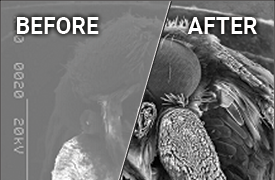
- Many functions for improving and adjusting the appearance of your images
- Reverse raster rotation
- Tilt correction
- Construction of anaglyph stereo image
- SEM resolution measurement
Image Annotation Software
Quartz PCI includes numerous tools for annotating your images. All annotations are contained in a separate overlay layer so that the image behind is preserved and so that the annotations can be easily moved and adjusted. It is possible to save a default overlay that contains, for example, your company logo or a Confidential indicator, that will be applied automatically to all images that are acquired. At the appropriate time, you can choose to burn the overlay into the image.
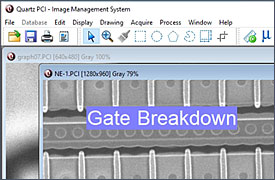
- Complete set of annotation tools
- Add micron marker to images
- Use of overlay layer preserves image
- Ability to burn in overlay
- Can have auto applied annotation (e.g., company logo or confidential indicator)
Image Measurement Software
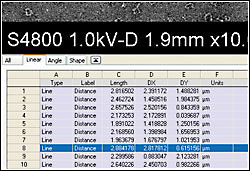
In addition to the standard annotation tools, PCI includes a comprehensive set of image measurement tools. Like the annotation tools, these tools operate in the overlay layer allowing measurements to be adjusted after their initial placement. As you make measurements, the results are displayed both on the image and in a spreadsheet grid below the image. The contents of this grid can be saved and easily copied into other software such as Microsoft® Excel. In applications, such as quality control or semiconductor process development, where the same measurements are repeated on numerous images, you can set up a Measurement Sequence that steps the analyst through the measurement procedure.
Quartz Imaging has also recently introduced our Automated Measurement (AM) Module for PCI which performs automated measurements on semiconductor features.
- Complete set of image measurement tools
- Measurement data displayed in grid and can be easily exported
- Measurement Sequence Feature saves time for repeated measurements
- New Automated Measurement module for PCI
Laboratory Report Generation Software
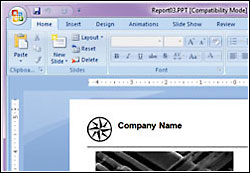
PCI includes a full–featured report layout tool. After you have acquired your images, or even while you are acquiring them, PCI makes it easy to produce polished, professional reports.
PCI database fields can be placed on the report and automatically filled with database information pertaining to the associated image. The same tools that are available for annotating images are available for adding annotations to the report. Master pages and templates facilitate the development of standard reports for your organization, incorporating elements such as corporate logos.
Reports can be exported in the Microsoft® Word and Microsoft® PowerPoint® file formats, so that you can continue working on them in the Microsoft® Office environment. Finished reports can be exported in the PDF for easy distribution to your colleagues and clients.
- Comprehensive built-in report generator and editor
- With PCI database, can create report in just a few clicks, regardless of number of images
- Easy to generate report template
- Reports can be exported in PDF, Word, and PowerPoint formats
Image Database Software
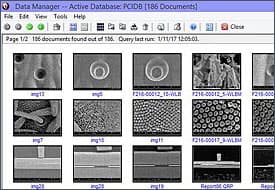
PCI Lab & Office include powerful tools to help you access and manage your images intuitively and to turn those images into usable information. Quartz Imaging's scalable family of high-performance image database solutions can help a single microscopist keep track of hundreds of images or help an entire organization keep track of millions of them.
In addition to tracking images and other data files, the Quartz PCI image database also tracks Jobs, Instrument Sessions and Samples.
The Workgroup Database is included with every copy of PCI Lab & Office. Designed for facilities with up to approximately 10 users, the Workgroup Database provides a simple, yet powerful, introduction to image database systems.
For larger organizations, Quartz PCI connects directly to the enterprise-grade Quartz LIMS database.
- Powerful searchable image database included
- Images can be stored in the most popular file formats
- Tracks jobs, sessions, samples, images and other documents
Laboratory Information Management System (LIMS) Integration
Quartz PCI is tightly coupled to the Quartz LIMS systems. Data acquired and processed in PCI is available immediately to LIMS users without any separate data upload step. Similarly, data stored in the LIMS system can be retrieved and processed directly from with the Quartz PCI software. PCI supports optional barcode readers to facilitate job and sample selection at the instruments. The use of PCI at each instrument allows us to collect fine-grained timing and instrument usage data to produce meaningful management and productivity reports.
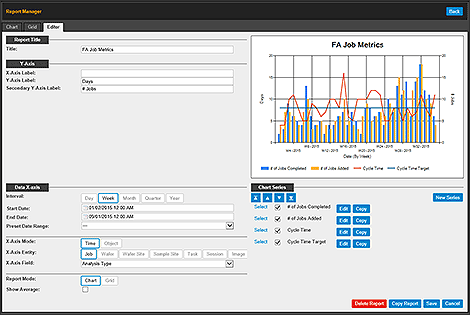
- PCI offers easy, fast and accurate uploading of all types of data and analysis results into the Quartz LIMS system
- Even more effective with barcode scanners at sample check-in and instruments
- Time Stamps - Tracks times by Job, Session, Sample, Instrument and Analyst - provides metrics for Lab Management Reports
Frequently Asked Questions (FAQ)
What is Quartz PCI?
Quartz PCI is professional microscopy image acquisition, processing, archiving, measurement and reporting software developed by Quartz Imaging Corporation. It is designed specifically for microscopists and is used by thousands of researchers worldwide to manage all aspects of the digital imaging workflow - from image capture through to analysis, reporting, and long-term archiving.
Who uses Quartz PCI?
Quartz PCI is used primarily by laboratory scientists, microscopists, materials scientists, and researchers across industries including semiconductor manufacturing, advanced materials, nanotechnology, aerospace, automotive, energy, and academic research.
What are the core capabilities of Quartz PCI?
Quartz PCI covers five primary functional areas:
- Image Acquisition - Capturing images from a wide range of microscopy instruments and devices
- Image Processing - Filtering, enhancement, color correction, rotation, tilt correction, and image mixing
- Image Measurement - Measurement of distances, angles, surface areas and shapes
- Image Annotation - Adding text, arrows, scale bars, geometric shapes, and overlays to images
- Reporting and Archiving - Generating professional reports and storing images in a structured database
What is the current version of Quartz PCI?
The current version is Quartz PCI Version 12, released in 2025.
What operating systems does Quartz PCI support?
Quartz PCI Version 12 runs on 32-bit and 64-bit versions of Microsoft Windows 7, Windows 8, Windows 10, and Windows 11
What types of imaging instruments do Quartz PCI support?
Quartz PCI supports image acquisition from virtually any image-producing device, including:
- SEMs
- TEMs
- Light microscopes
- TWAIN devices such as high-resolution cameras on light microscopes
Which electron microscope manufacturers' calibrated file formats do PCI import?
PCI can import calibrated images with embedded calibration data from most major EM manufacturers, including Delong, FEI, Gatan (DM3, DM4), Hitachi, Hitachi CDSEM, JEOL, Phenom, Tescan, ThermoFisher, and Zeiss. Keyence light microscope files are also supported, as is the EMD file format (added in Version 12).
What image file formats can PCI import and export?
PCI supports import of most popular image file formats. Supported save formats include TIFF, JPEG, BMP, JPEG2000, and PNG.
PCI also imports the EMSA format for EDX x-ray spectra.
What is the PCI Spider function?
The PCI/Spider version is used with instruments that output digital image files directly, enabling a hands-free acquisition workflow.
It automatically monitors a designated "hot folder" and loads any images that are saved to that folder into PCI.
What image processing operations do Quartz PCI support?
PCI includes a full set of processing tools including:
- Contrast, brightness, and gamma adjustment via histogram functions
- Smoothing, sharpening, and median filtering
- Color correction and false coloring
- Image resizing and fine rotation (with separate coarse and fine sliders in v12)
- Tilt correction (compensates for stage tilt before measurement)
- Reverse raster rotation (using calibration data embedded in the image file)
- Image mixing using arithmetic operators
- Anaglyph stereo image construction from left/right image pairs
- Zooming, panning, and slide show display
Can PCI correct for stage tilt in SEM images?
Yes. PCI includes a Tilt Correction function that compensates for stage tilt prior to performing measurements. The image status bar also displays whether tilt correction has been applied.
Does PCI support SEM image sharpness measurement?
Yes. PCI includes an SEM Image Sharpness Measurement function that calculates sharpness using the FT and DR methods described in ISO standard ISO/TS 24597. It can operate on single or multiple images and integrates with PCI's report editor to produce custom instrument performance reports.
What manual measurement tools are included in PCI?
PCI includes a comprehensive set of manual measurement tools:
- Distance measurement (including caliper tool)
- Angle measurement (including four-point angle)
- Curve length and polyline length
- Shape measurement tools (circles, ellipses, rectangles, polygons, freehand shapes)
- Micron marker functions for images that do not contain an embedded scale marker
- Measurement Sequence - allows a pre-programmed sequence of measurements to be repeated
- Measurement Grid - displays results in a spreadsheet that can be exported to Excel
Can measurements be exported to Excel or other software?
Yes. Measurement results are displayed in a spreadsheet grid within PCI and can be easily pasted or exported to Microsoft Excel or other software.
Does PCI support automated measurement?
Yes, through the optional PCI-AM (Automated Measurement) module. PCI Version 12 works with PCI-AM Version 9, which provides fully automated measurement of features in microscopy images.
What annotation tools are available in PCI?
PCI provides a complete annotation toolkit including text, arrows, lines, circles/ellipses, rectangles, polygons, freehand shapes, and scale bars. All annotations are placed on a separate overlay layer, meaning they can be moved, edited, or deleted without affecting the underlying image. Drawing elements can also be rotated.
Can annotations be permanently embedded in an image?
Yes. PCI includes an “Apply to Image” option that permanently marks annotations into the image file.
Does PCI support Unicode for annotations and reports?
Yes. PCI is a Unicode application, which allows images to be annotated and reports to be generated using Unicode characters. This supports languages that do not use Roman characters and facilitates data sharing within international organizations. This functionality was added in PCI v11.
What reporting capabilities do PCI include?
PCI includes a comprehensive built-in report editor that supports:
- Layout of images, text, and drawing elements on any number of pages
- Master page templates
- Grid and snap-to-grid alignment
- Automatic population of database fields within reports
- Automatic report generation from templates
- Export to PDF, Microsoft Word, and PowerPoint (PPTX) formats
Can I export PCI reports to PowerPoint without having Microsoft Office installed?
Yes. Job and client reports created in PCI can be exported directly to PPTX format without requiring Microsoft Office to be installed on the workstation. This feature is available to Quartz LIMS customers.
Can PCI merge reports from multiple samples into a single document?
Yes. PCI provides a fast report merge function that combines multiple reports for the same job in the correct sample sequence. This feature is available to Quartz LIMS customers.
Does Quartz PCI include a database for managing images?
Yes. A Workgroup Database is included as a standard feature with PCI. It tracks jobs, sessions, samples, images, and external documents including multimedia files. An Enterprise Database (SQL Server) is available as an option for larger, multi-user environments.
Is the PCI database compatible with third-party database tools?
Yes. The PCI database is ODBC-compliant, ensuring compatibility with third-party tools such as Microsoft Access.
Can PCI search and retrieve images based on metadata?
Yes. PCI provides powerful database query capabilities that allow you to search for images based on keywords and a wide range of other criteria.
Does PCI support CD/DVD archiving?
Yes. PCI allows you to burn CDs and DVDs directly from within the application, with full support for removable media.
What is the PCI "Send To" function?
The "Send To" function allows documents and files from other Windows applications to be sent directly to the PCI database. As of Version 12, it supports file transfers of files greater than 4 GB in size.
Licensing and Purchasing
How is Quartz PCI sold?
Quartz PCI is sold by subscription. As a subscriber, you receive ongoing access to technical support and periodic updates to the latest version.
What is included in a PCI subscription?
A PCI subscription includes access to the current version of the software, ongoing technical support, and periodic software updates as they are released.
How do I activate Quartz PCI after installation?
If the computer has internet access, activation occurs automatically the first time the software is launched. If automatic activation fails, you can activate manually by saving an Activation Request file and uploading it to https://activation.quartzimaging.com, or by emailing the file to activate@quartzimaging.com
Can I install PCI on a computer without internet access?
Yes. Manual activation is available. You save the Activation Request file to a USB drive, transfer it to an internet-connected computer, upload it to the Quartz Imaging activation portal, then return the License Key file to the offline computer and load it into PCI.
Technical Support
How do I get technical support for Quartz PCI?
Quartz Imaging provides technical support to all active subscribers. You can contact Quartz Imaging directly via the support email listed on the Contact page. PCI Version 12 also includes a direct link in the Help menu to Quartz Imaging's technical support AI chatbot, which provides instant answers to common support questions.
Is the technical support AI chatbot included with PCI?
Yes. The Help menu in PCI Version 12 includes a link to Quartz Imaging's technical support AI chatbot. The chatbot is continuously updated with the latest product information.